Note
Go to the end to download the full example code.
BADA ARPM Descent Calculation
Example of BADA4 trajectory full descent taking into account the compelte BADA ARPM model
import matplotlib.pyplot as plt

from pyBADA import TCL as TCL
from pyBADA import myTypes
from pyBADA.badaAircraft import BadaAircraft

# load BADA specific model
AC = BadaAircraft(badaFamily="BADA4", badaVersion="DUMMY", acName="Dummy-TWIN")

trajectory = TCL.apcDescentCalculation(
    AC=AC,
    descentType=myTypes.DescentType.CASMACH,
    pressureAltitude=myTypes.PressureAltitude(
        initPressureAltitude=AC.hmo,
        finalPressureAltitude=0,
        stepPressureAltitude=1000,
    ),
    speed=myTypes.Speed(
        accelerationLevelKind=myTypes.AccelerationLevelKind.BEFORE,
        stepSpeed=10,
    ),
    mass=0.7 * AC.MTOW,
    meteo=myTypes.Meteo(deltaTemp=0),
    CASMACHProfileConfiguration=myTypes.DescentCASMACHProfileConfiguration(),
)


# ========================================================
# OUTPUT and PLOTS
# ========================================================

Hp = trajectory.getAllValues(AC, "Hp")
mass = trajectory.getAllValues(AC, "mass")
CAS = trajectory.getAllValues(AC, "CAS")
TAS = trajectory.getAllValues(AC, "TAS")
fuel = trajectory.getAllValues(AC, "FUEL")
fuelConsumed = trajectory.getAllValues(AC, "FUELCONSUMED")
time = trajectory.getAllValues(AC, "time")
dist = trajectory.getAllValues(AC, "dist")

# ---------------------------------------------------------
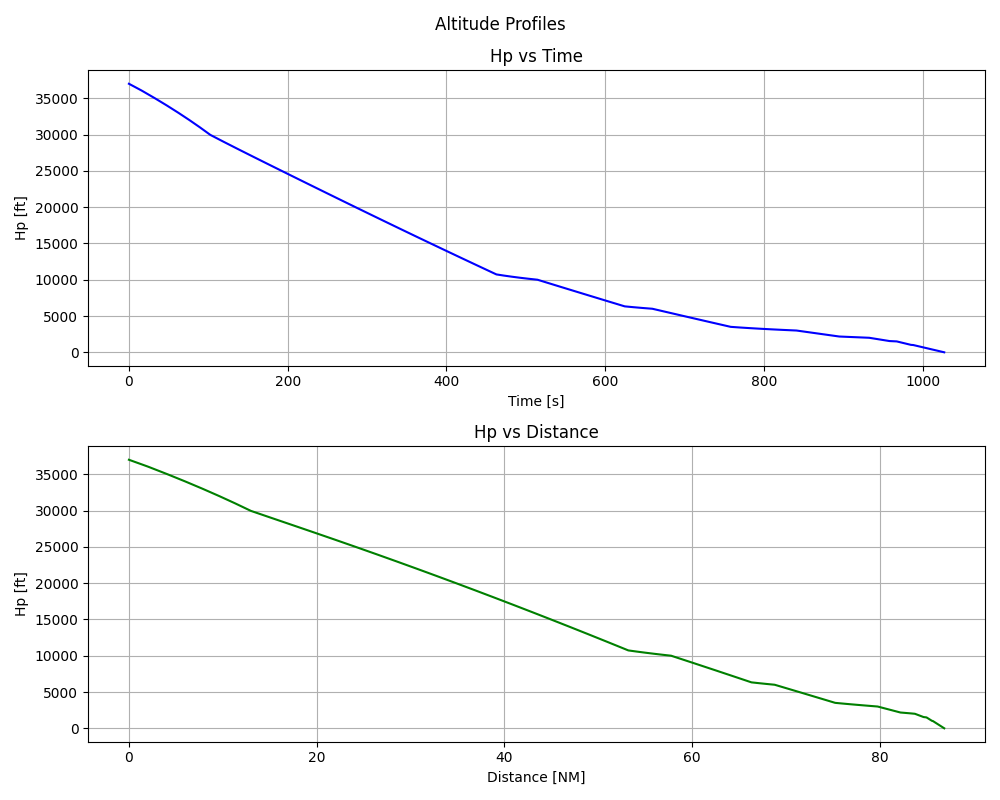
# Plot 1: Hp = f(time) and Hp = f(dist) as 2 subplots
# ---------------------------------------------------------
fig1, (ax1, ax2) = plt.subplots(2, 1, figsize=(10, 8))
fig1.suptitle("Altitude Profiles")

# Hp = f(time)
ax1.plot(time, Hp, color="blue")
ax1.set_title("Hp vs Time")
ax1.set_xlabel("Time [s]")
ax1.set_ylabel("Hp [ft]")
ax1.grid(True)

# Hp = f(dist)
ax2.plot(dist, Hp, color="green")
ax2.set_title("Hp vs Distance")
ax2.set_xlabel("Distance [NM]")
ax2.set_ylabel("Hp [ft]")
ax2.grid(True)

plt.tight_layout()

# ---------------------------------------------------------
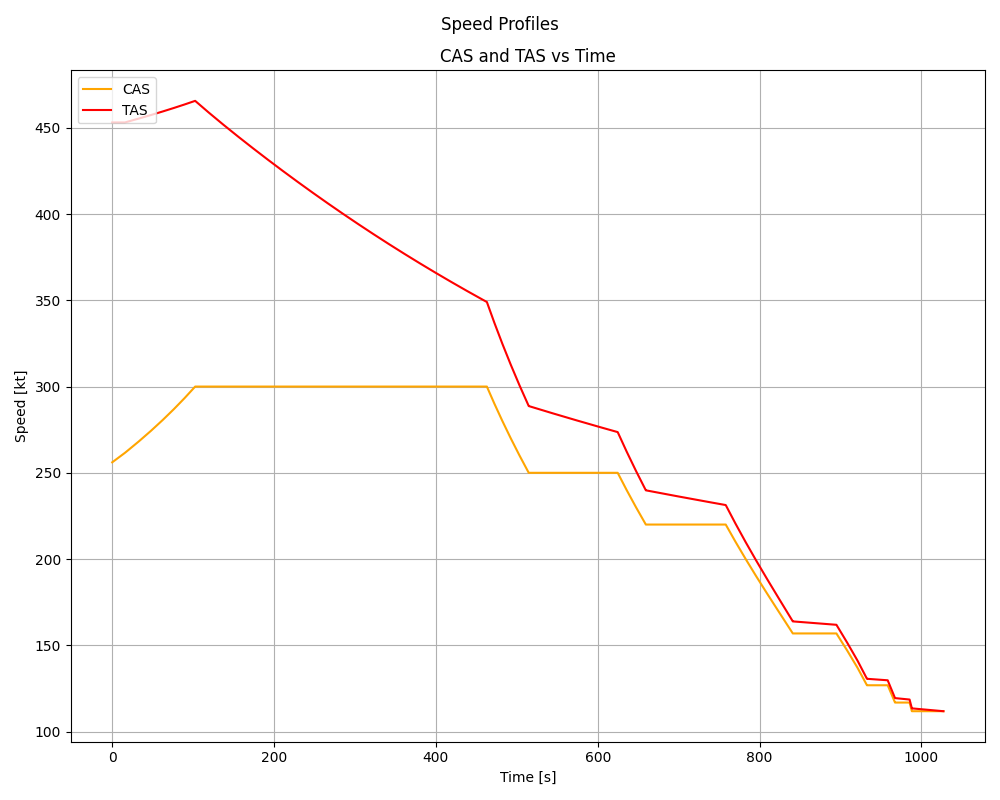
# Plot 2: CAS = f(time) and TAS = f(time) on a single axis
# ---------------------------------------------------------
fig2, ax3 = plt.subplots(figsize=(10, 8))
fig2.suptitle("Speed Profiles")

# Plot both CAS and TAS on the same axes
ax3.plot(time, CAS, color="orange", label="CAS")
ax3.plot(time, TAS, color="red", label="TAS")

# Single set of labels and grid
ax3.set_title("CAS and TAS vs Time")
ax3.set_xlabel("Time [s]")
ax3.set_ylabel("Speed [kt]")
ax3.grid(True)
ax3.legend(loc="upper left")

plt.tight_layout()

# ---------------------------------------------------------
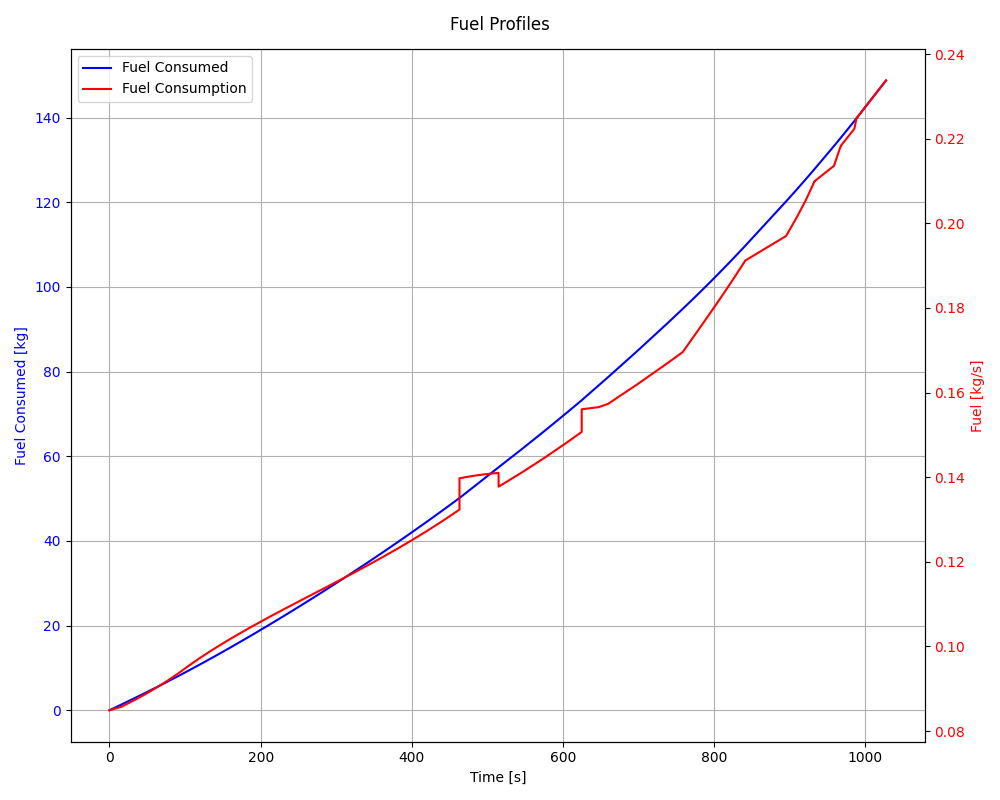
# Plot 3: fuelConsumed = f(time) and fuel = f(time)
# ---------------------------------------------------------
fig3, ax5 = plt.subplots(figsize=(10, 8))
fig3.suptitle("Fuel Profiles")

# Primary Y-axis (Left): fuelConsumed = f(time)
color_consumed = "blue"
ax5.plot(time, fuelConsumed, color=color_consumed, label="Fuel Consumed")
ax5.set_xlabel("Time [s]")
ax5.set_ylabel("Fuel Consumed [kg]", color=color_consumed)
ax5.tick_params(axis="y", labelcolor=color_consumed)
ax5.grid(True)

# Secondary Y-axis (Right): fuel = f(time)
ax6 = ax5.twinx()  # Create a second axes that shares the same x-axis
color_rate = "red"
ax6.plot(time, fuel, color=color_rate, label="Fuel Consumption")
ax6.set_ylabel("Fuel [kg/s]", color=color_rate)
ax6.tick_params(axis="y", labelcolor=color_rate)

# Combine legends from both axes so they appear in one box
lines_1, labels_1 = ax5.get_legend_handles_labels()
lines_2, labels_2 = ax6.get_legend_handles_labels()
ax5.legend(lines_1 + lines_2, labels_1 + labels_2, loc="upper left")

plt.tight_layout()

# ---------------------------------------------------------
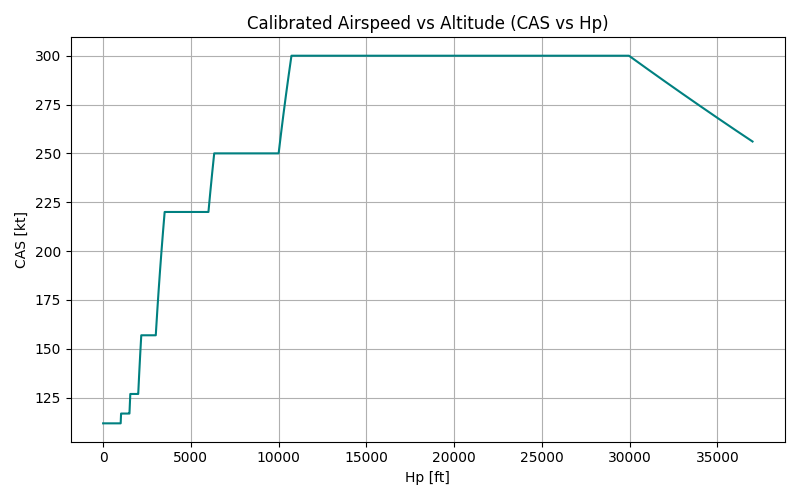
# Plot 4: CAS = f(Hp)
# ---------------------------------------------------------
fig4, ax7 = plt.subplots(figsize=(8, 5))

# CAS = f(Hp)
ax7.plot(Hp, CAS, color="teal")
ax7.set_title("Calibrated Airspeed vs Altitude (CAS vs Hp)")
ax7.set_xlabel("Hp [ft]")
ax7.set_ylabel("CAS [kt]")
ax7.grid(True)

plt.tight_layout()

# Display all the figures
plt.show()
Total running time of the script: (0 minutes 1.161 seconds)